
User info fetcher
The User info fetcher allows for additional information to be obtained from the configured backend (for example, Keycloak). You can then write Rego rules for OpenPolicyAgent which make an HTTP request to the User info fetcher and make use of the additional information returned for the username or user id.
You can enable the User info fetcher sidecar as follows:
apiVersion: opa.stackable.tech/v1alpha2
kind: OpaCluster
metadata:
  name: opa
spec:
  image:
    productVersion: 1.0.0
  clusterConfig:
    userInfo: (1)
      backend:
        keycloak:
          hostname: keycloak.my-namespace.svc.cluster.local
          port: 8443
          tls:
            verification:
              server:
                caCert:
                  secretClass: tls (2)
          clientCredentialsSecret: user-info-fetcher-client-credentials (3)
          adminRealm: master (4)
          userRealm: master (4)
      cache: # optional, enabled by default
        entryTimeToLive: 60s # optional, defaults to 60s
  servers:
    roleGroups:
      default: {}
---
apiVersion: v1
kind: Secret
metadata:
  name: user-info-fetcher-client-credentials
stringData:
  clientId: user-info-fetcher (3)
clientSecret: user-info-fetcher-client-secret (3)| 1 | Enable the user-info-fetcher sidecar |
| 2 | Enable TLS verification using the CA from the tls SecretClass. |
| 3 | Obtain Keycloak API credentials from the specified Secret. The Secret must have clientId and clientSecret entries. |
| 4 | Refer to the applicable realm in your Keycloak server. |
Currently the following backends are supported:
Backends
The user info fetcher can fetch data from a few different backends. We currently recommend the Keycloak backend.
Keycloak
Fetch groups and extra credentials, but not roles.
The OAuth2 Client in Keycloak must be given the view-users Service Account Role for the realm that the users are in.
|
The user-info-fetcher requires a service account in Keycloak with the permissions to read user objects. To create such as user you need to take the following steps:
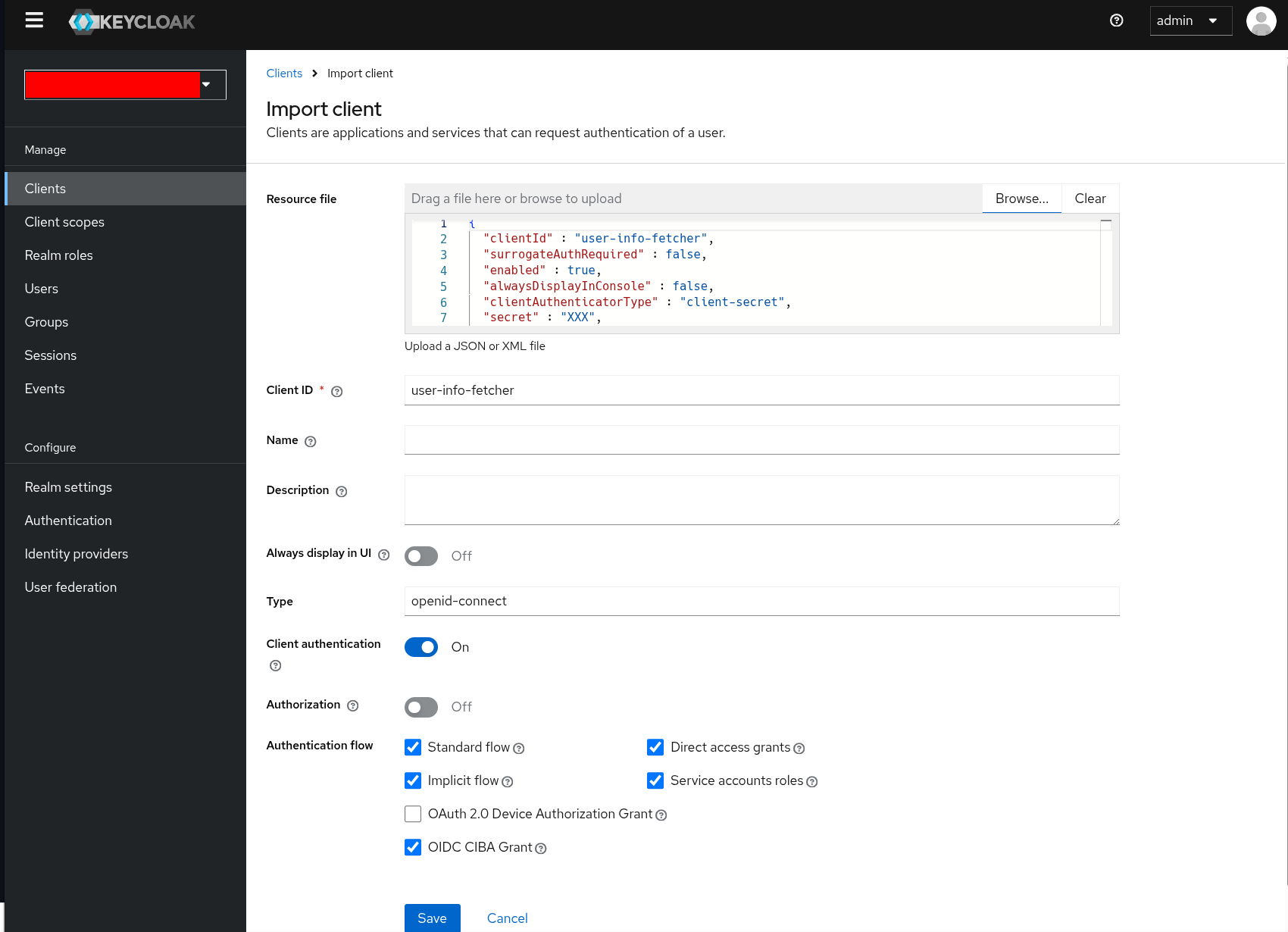
With your user realm selected click on Clients at the left side and use the Import client button:

Create a file with the following JSON object.
Swap out secret with your desired password and potentially redirectUris and webOrigins.
{
  "clientId" : "user-info-fetcher",
  "surrogateAuthRequired" : false,
  "enabled" : true,
  "alwaysDisplayInConsole" : false,
  "clientAuthenticatorType" : "client-secret",
  "secret" : "XXX",
  "redirectUris" : [ "*" ],
  "webOrigins" : [ "*" ],
  "notBefore" : 0,
  "bearerOnly" : false,
  "serviceAccountsEnabled" : true,
  "publicClient" : false,
  "frontchannelLogout" : true,
  "protocol" : "openid-connect",
  "attributes" : {
    "oidc.ciba.grant.enabled" : "true",
    "oauth2.device.authorization.grant.enabled" : "false"
  },
  "authenticationFlowBindingOverrides" : { },
  "fullScopeAllowed" : true
}
Upload the file to the client importer and click on Save.
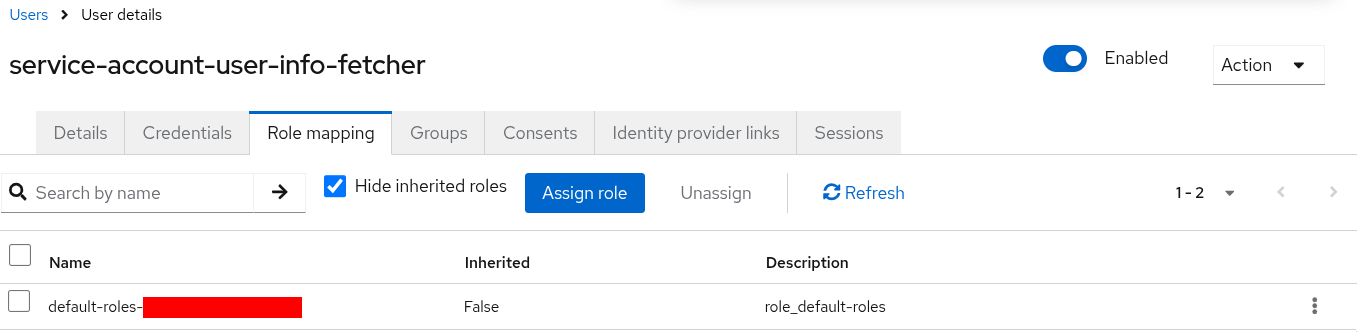
Afterwards you need to modify the created user service-account-user-info-fetcher.
To achieve this open the user and click on the Role mapping tab:
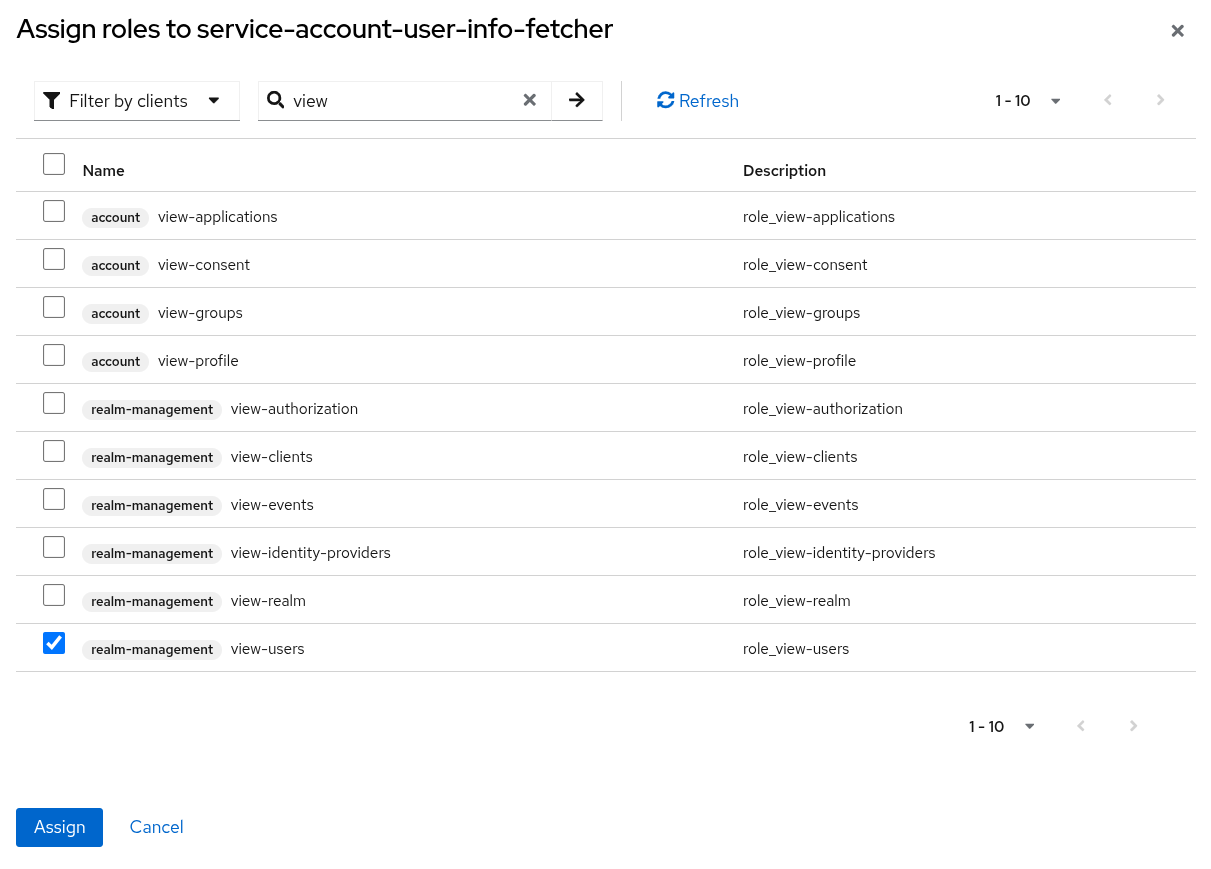
Assign the role view-users as shown below.
This is necessary to allow the user to read other users' information.
Afterwards you can store the user-info-fetcher credentials in Kubernetes in a Secret:
apiVersion: v1
kind: Secret
metadata:
  name: user-info-fetcher-client-credentials
stringData:
  clientId: user-info-fetcher
  clientSecret: XXX # replace with your chosen password
Active Directory
| The Active Directory backend is experimental, and subject to change. |
Fetches user attributes and groups over LDAP.
For this to work user-info-fetcher needs to be provided with a Kerberos keytab that enables it to access Active Directory. This is provided by a configurable SecretClass.
spec:
  clusterConfig:
    userInfo:
      backend:
        experimentalActiveDirectory: (1)
          ldapServer: sble-addc.sble.test (2)
          baseDistinguishedName: DC=sble,DC=test (3)
          customAttributeMappings: (4)
            country: c (5)
          additionalGroupAttributeFilters: (6)
            foo: bar
          kerberosSecretClassName: kerberos-ad (7)
          tls:
            verification:
              server:
                caCert:
                  secretClass: tls-ad (8)
      cache: # optional, enabled by default
entryTimeToLive: 60s # optional, defaults to 60s| 1 | Enables the Active Directory backend |
| 2 | The hostname of the domain controller |
| 3 | The distinguished name to search, users and groups outside of this will not be seen |
| 4 | Arbitrary LDAP attributes can be requested to be fetched |
| 5 | c stores the ISO-3166 country code of the user |
| 6 | Groups can be filtered by LDAP attributes to reduce the load in searching for membership. * can be used as a wildcard in these filters. |
| 7 | The name of the SecretClass that knows how to create Kerberos keytabs trusted by Active Directory |
| 8 | The name of the SecretClass that contains the Active Directory’s root CA certificate(s) |
When retrieving user groups from Active Directory, the user info fetcher filters by both upn as well as sAmAccountName using the following query:
(&(objectClass=user)(|(userPrincipalName=<upn>@<realm>)(userPrincipalName=<upn>)(sAMAccountName=<upn>)))where <upn> is the user principal name of the user and <realm> is the realm of the user.
The above is to accommodate for different Active Directory user management strategies and is subject to change in future releases.
Entra
| The Entra backend was marked as non-experimental in SDP 26.3.0. |
Fetch groups but not roles for a user from Entra.
The client in Entra must use the client_credentials flow and requires the User.Read.All and GroupMember.Read.All permissions.
To grant these, open your app registration in the Entra portal and go to API permissions, then Add a permission and Microsoft Graph.
Select Application permissions (not Delegated permissions) and add User.Read.All and GroupMember.Read.All.
Application permissions require administrator consent. After adding the permissions, click Grant admin consent for <tenant>. Without this, the client_credentials flow fails with an authorization error even though the permissions are listed.
|
The values used in the configuration below can be found in the Entra portal as follows:
-
tenantId: the Directory (tenant) ID on the app registration’s Overview page. -
clientId: the Application (client) ID on the app registration’s Overview page. -
clientSecret: create one under Certificates & secrets, then Client secrets, then New client secret, and copy its Value (not the Secret ID).
spec:
  clusterConfig:
    userInfo:
      backend:
        entra: (1)
          tenantId: 00000000-0000-0000-0000-000000000000 (2)
clientCredentialsSecret: user-info-fetcher-client-credentials (3)| 1 | Enables the Entra backend |
| 2 | The Entra tenant ID |
| 3 | A secret containing the clientId and clientSecret keys |
OpenLDAP
| The OpenLDAP backend is experimental, and subject to change. |
Fetch user attributes and groups over LDAP from OpenLDAP servers using simple bind authentication.
OpenLDAP supports different group schemas:
-
groupOfNames (default): Groups contain a
memberattribute with full user DNs -
posixGroup: Groups contain a
memberUidattribute with usernames
spec:
  clusterConfig:
    userInfo:
      backend:
        experimentalOpenLdap: (1)
          hostname: openldap.default.svc.cluster.local (2)
          port: 1636 (3)
          searchBase: dc=example,dc=org (4)
          bindCredentials: (5)
            secretClass: openldap-bind-credentials (6)
          userIdAttribute: entryUUID (7)
          userNameAttribute: uid (8)
          groupsSearchBase: ou=groups,dc=example,dc=org (9)
          groupMemberAttribute: member (10)
          customAttributeMappings: (11)
            email: mail
            displayName: cn
            givenName: givenName
            surname: sn
          tls: (12)
            verification:
              server:
                caCert:
                  secretClass: openldap-tls (13)
      cache: # optional, enabled by default
entryTimeToLive: 60s # optional, defaults to 60s| 1 | Enables the OpenLDAP backend |
| 2 | The hostname of the LDAP server |
| 3 | The port of the LDAP server. Defaults to 636 for LDAPS, or 389 for plain LDAP |
| 4 | The base distinguished name to search. Users outside of this will not be seen |
| 5 | Configuration for LDAP bind credentials |
| 6 | The name of the SecretClass that provides the bind credentials. The secret must contain user and password keys |
| 7 | LDAP attribute used for the user’s unique identifier. Defaults to entryUUID |
| 8 | LDAP attribute used for the username. Defaults to uid |
| 9 | LDAP search base for groups. If not specified, uses the main searchBase |
| 10 | LDAP attribute on group objects that contains member references. Use member for groupOfNames (default) or memberUid for posixGroup |
| 11 | Arbitrary LDAP attributes can be requested to be fetched and returned in the user info response. Use this to map custom LDAP attributes to custom attribute names in the response |
| 12 | Optional TLS configuration for secure LDAP connections |
| 13 | The name of the SecretClass that contains the LDAP server’s root CA certificate(s) |
When retrieving user information from OpenLDAP, the user info fetcher first searches for the user by the userNameAttribute (defaults to uid) or userIdAttribute (defaults to entryUUID) depending on the request type. When a user is found, it searches for groups containing the user:
-
If
groupMemberAttributeismemberUid: Searches for groups wherememberUidequals the username (forposixGroup) -
Otherwise (e.g. if
groupMemberAttributeismember, which is the default): Searches for groups wherememberequals the user’s full DN (forgroupOfNames)
User info fetcher API
User information can be retrieved from regorules using the functions userInfoByUsername(username) and userInfoById(id) in data.stackable.opa.userinfo.v1.
An example of the returned structure:
{
  "id": "af07f12c-a2db-40a7-93e0-874537bdf3f5",
  "username": "alice",
  "groups": [
    "/admin"
  ],
  "customAttributes": {}
}
The exact formats of id and groups will vary depending on the backend in use. This example is using the Keycloak backend.
|
Debug request
To debug the user-info-fetcher you can curl it’s API for a given user.
To achieve this shell into the opa container and execute
curl --header "Content-Type: application/json" -d '{"username":"my-user"}' http://127.0.0.1:9476/userYou can also use -d '{"id":"123456"}' to query by the user ID.
Rego rule library
The HTTP API exposed by the user-info-fetcher can be called directly using the rego function http.send.
However, we provide a convenience rego rule library, which we ship with OpaClusters by default.
For example, the following rule allows access for users in the /admin group:
package test

default allow := false

allow if {
    user := data.stackable.opa.userinfo.v1.userInfoById(input.userId)
    "/admin" in user.groups
}
Rotating credentials
The credentials both info-fetchers authenticate with are mounted from a Secret, and Kubernetes propagates a change to that Secret into the running container within about a minute.
The fetchers therefore re-read the credential themselves. They keep it in memory, and when the other side rejects it they read the file again and retry the request once with the new value. Updating the Secret is all that is needed, no restart and no rolling of the OpaCluster.
Two details worth knowing:
-
The re-read happens only when the credential is rejected, not on a timer, so there is no window in which requests fail while waiting for a refresh.
-
If the file has not changed, the request is not retried. A credential that was revoked rather than rotated is the same value on disk, so a retry would only be rejected again and would double the load on the backend for every request. The log then says so, at
WARN.
Until the Secret is updated, lookups keep failing, which fails closed: the rule library only returns a value for 200 OK, so a rule requiring a positive signal denies (see below).
Failures are cached for a few seconds, so a credential that is revoked and not replaced does not turn into a request storm against the backend.
|
Only the secret itself is re-read, not the identifier next to it.
Rotating a Keycloak and Entra |
Behaviour when the lookup fails
|
A failed lookup does not deny access by itself. Only the shape of your rule decides that. |
The library only returns a value for 200 OK.
When the fetcher answers with an error (the identity provider is unreachable, the credentials were rejected, or the user does not exist), the lookup is undefined rather than an object, so the error envelope can never reach a rule as if it were user information.
The rule above is written to require a positive signal, so an undefined lookup leaves allow at its default of false.
A rule keyed on the absence of a signal instead (deny users in a blocked group, allow everyone else) becomes undefined too, and an undefined deny means not denied.
An identity provider outage would then grant access to everybody.
So always require a positive signal.
|
Where the product’s OPA client lets you set query parameters, also set |
The library waits 5 seconds for the fetcher, deliberately far below the 60 seconds the fetcher itself allows for talking to the identity provider: an authorization decision has to be answered promptly. When the provider is slower than that, the caller is left without an answer, while the fetcher completes the lookup and caches it, so the next request is served from the cache.